Supplier Management
This guide covers supplier management for EZ Cloud Enterprise.
If your organization uses EZ Cloud Essentials (standalone), see Supplier Management (Essentials).
EZ Cloud Enterprise integrates with your ERP system to automatically sync supplier master data. This enables advanced validation during invoice processing and ensures your supplier data stays current with your system of record.
How ERP Sync Works
- Suppliers and sites are synced from your ERP system
- Sync runs automatically on a scheduled basis (typically nightly)
- Administrators can trigger manual syncs from Administration → Supplier Sync
- Synced data is used for:
- Supplier name validation during invoice extraction
- Supplier site validation for invoice matching
- Auto-population of supplier details on invoices
Supplier List
Access suppliers by clicking Suppliers in the main navigation.
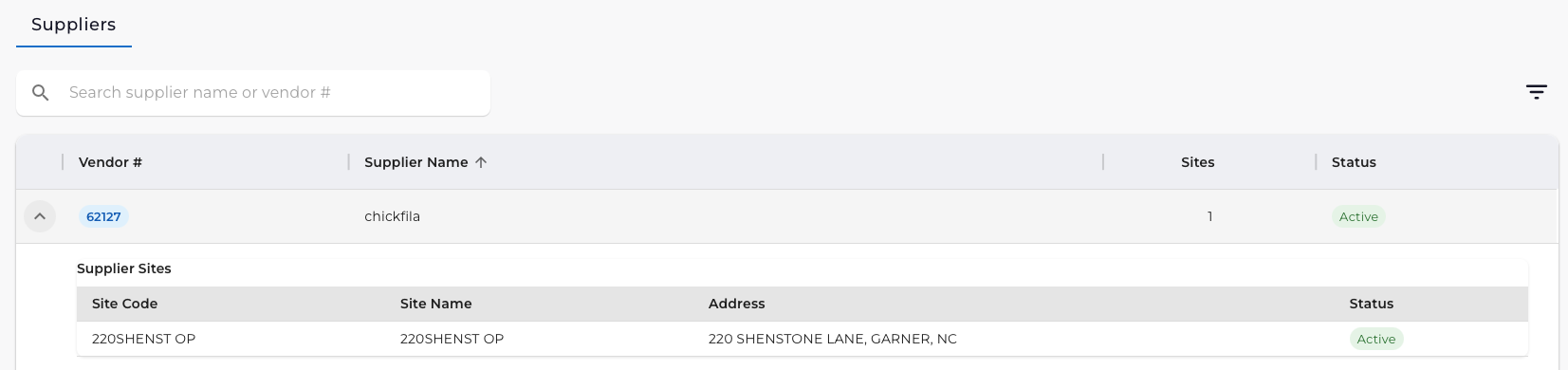
The Suppliers view displays data synced from your ERP:
| Column | Description |
|---|---|
| Vendor # | Vendor identifier from your ERP |
| Supplier Name | Vendor name |
| Sites | Number of supplier sites/locations |
| Status | Active or Inactive |
Supplier Sites
Click the expand arrow next to a supplier to view their sites:
| Column | Description |
|---|---|
| Site Code | Site identifier |
| Site Name | Site name |
| Address | Physical address |
| Status | Site status (Active/Inactive) |
Supplier sites are used during invoice processing for supplier site validation—ensuring invoices are matched to the correct supplier location.
Filtering Suppliers
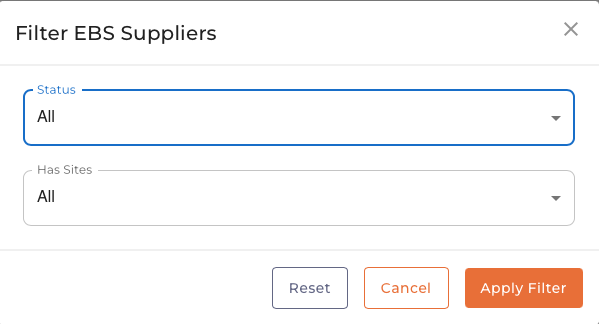
| Filter | Description |
|---|---|
| Status | Filter by Active, Inactive, or All |
| Has Sites | Filter by suppliers with or without sites |
Click Apply Filter to search or Reset to clear filters.
Supplier Sync
Administrators can manage sync operations from Administration → Supplier Sync.
Sync Types
| Type | Description |
|---|---|
| Delta Sync | Fetches only suppliers changed since last sync (recommended for daily use) |
| Full Sync | Fetches all suppliers from your ERP (use for initial setup or troubleshooting) |
Running a Sync
- Navigate to Administration → Supplier Sync
- Review current statistics (Total Suppliers, Total Sites, Last Synced)
- Click Delta Sync for incremental updates, or Full Sync for complete refresh
- Monitor progress in the Sync History table
See Supplier Sync for detailed sync management instructions.
Validation During Invoice Processing
When invoices are processed, Enterprise uses synced supplier data to:
- Match supplier names - AI extraction compares against known suppliers
- Validate supplier status - Ensures supplier is active in your ERP
- Verify supplier sites - Matches invoice address to supplier sites
- Auto-populate fields - Fills supplier details from synced data
This reduces manual data entry and catches errors early in the process.
Quick Reference
| Task | How To |
|---|---|
| View suppliers | Click Suppliers in navigation |
| View supplier sites | Click expand arrow next to supplier |
| Filter suppliers | Use Status and Has Sites filters |
| Run delta sync | Administration → Supplier Sync → Delta Sync |
| Run full sync | Administration → Supplier Sync → Full Sync |
| Check sync status | Administration → Supplier Sync → View history |
Key Differences from Essentials
| Feature | Enterprise | Essentials |
|---|---|---|
| Supplier data source | Synced from ERP | Manual entry |
| Supplier Portal | Not available | Available |
| Supplier Documents | Not available | Available |
| Supplier Sites | Yes | No |
| Supplier Validation | Full (name + site) | Basic |